

Agent
Review
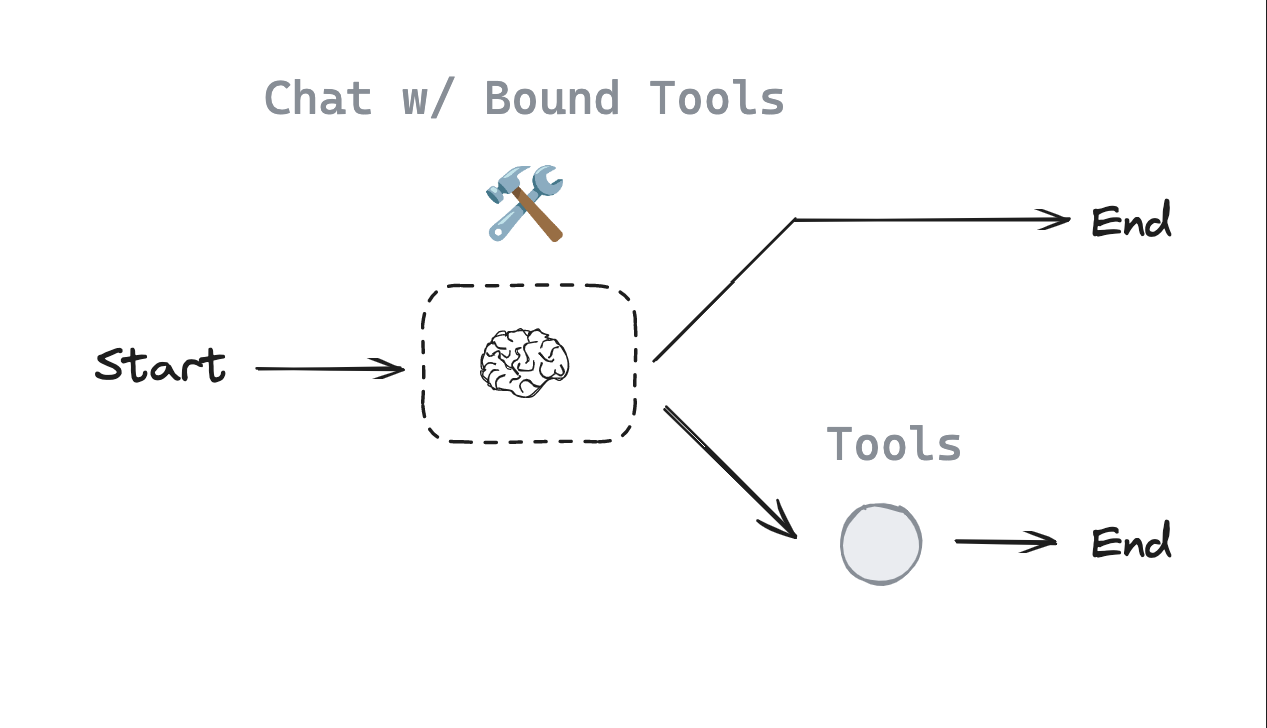
We built a router.
- Our chat model will decide to make a tool call or not based upon the user input
- We use a conditional edge to route to a node that will call our tool or simply end
Goals
Now, we can extend this into a generic agent architecture.
In the above router, we invoked the model and, if it chose to call a tool, we returned a ToolMessage to the user.
But, what if we simply pass that ToolMessage back to the model?
We can let it either (1) call another tool or (2) respond directly.
This is the intuition behind ReAct, a general agent architecture.
act- let the model call specific toolsobserve- pass the tool output back to the modelreason- let the model reason about the tool output to decide what to do next (e.g., call another tool or just respond directly)
This general purpose architecture can be applied to many types of tools.
from dotenv import load_dotenv
load_dotenv()
%%capture --no-stderr
%pip install --quiet -U langchain-deepseek langchain_core langgraph langgraph-prebuilt
import os
os.environ["LANGSMITH_TRACING"] = "true"
os.environ["LANGSMITH_PROJECT"] = "langchain-academy"
from langchain_deepseek import ChatDeepSeek

def multiply(a: int, b: int) -> int:
    """Multiply a and b.

    Args:
        a: first int
        b: second int
    """
    return a * b

# This will be a tool
def add(a: int, b: int) -> int:
    """Adds a and b.

    Args:
        a: first int
        b: second int
    """
    return a + b

def divide(a: int, b: int) -> float:
    """Divide a and b.

    Args:
        a: first int
        b: second int
    """
    return a / b

tools = [add, multiply, divide]
llm = ChatDeepSeek(model="deepseek-v4-pro")

# For this ipynb we set parallel tool calling to false as math generally is done sequentially, and this time we have 3 tools that can do math
# the DeepSeek model specifically defaults to parallel tool calling for efficiency, see https://python.langchain.com/docs/how_to/tool_calling_parallel/
# play around with it and see how the model behaves with math equations!
llm_with_tools = llm.bind_tools(tools, parallel_tool_calls=False)
Let's create our LLM and prompt it with the overall desired agent behavior.
from langgraph.graph import MessagesState
from langchain_core.messages import HumanMessage, SystemMessage

# System message
sys_msg = SystemMessage(content="You are a helpful assistant tasked with performing arithmetic on a set of inputs.")

# Node
def assistant(state: MessagesState):
   return {"messages": [llm_with_tools.invoke([sys_msg] + state["messages"])]}
As before, we use MessagesState and define a Tools node with our list of tools.
The Assistant node is just our model with bound tools.
We create a graph with Assistant and Tools nodes.
We add tools_condition edge, which routes to End or to Tools based on whether the Assistant calls a tool.
Now, we add one new step:
We connect the Tools node back to the Assistant, forming a loop.
- After the
assistantnode executes,tools_conditionchecks if the model's output is a tool call. - If it is a tool call, the flow is directed to the
toolsnode. - The
toolsnode connects back toassistant. - This loop continues as long as the model decides to call tools.
- If the model response is not a tool call, the flow is directed to END, terminating the process.
from langgraph.graph import START, StateGraph
from langgraph.prebuilt import tools_condition
from langgraph.prebuilt import ToolNode
from IPython.display import Image, display

# Graph
builder = StateGraph(MessagesState)

# Define nodes: these do the work
builder.add_node("assistant", assistant)
builder.add_node("tools", ToolNode(tools))

# Define edges: these determine how the control flow moves
builder.add_edge(START, "assistant")
builder.add_conditional_edges(
    "assistant",
    # If the latest message (result) from assistant is a tool call -> tools_condition routes to tools
    # If the latest message (result) from assistant is a not a tool call -> tools_condition routes to END
    tools_condition,
)
builder.add_edge("tools", "assistant")
react_graph = builder.compile()

# Show
display(Image(react_graph.get_graph(xray=True).draw_mermaid_png()))

messages = [HumanMessage(content="Add 3 and 4. Multiply the output by 2. Divide the output by 5")]
messages = react_graph.invoke({"messages": messages})
for m in messages['messages']:
    m.pretty_print()
================================ Human Message =================================

Add 3 and 4. Multiply the output by 2. Divide the output by 5
================================== Ai Message ==================================
Tool Calls:
  add (call_i8zDfMTdvmIG34w4VBA3m93Z)
 Call ID: call_i8zDfMTdvmIG34w4VBA3m93Z
  Args:
    a: 3
    b: 4
================================= Tool Message =================================
Name: add

7
================================== Ai Message ==================================
Tool Calls:
  multiply (call_nE62D40lrGQC7b67nVOzqGYY)
 Call ID: call_nE62D40lrGQC7b67nVOzqGYY
  Args:
    a: 7
    b: 2
================================= Tool Message =================================
Name: multiply

14
================================== Ai Message ==================================
Tool Calls:
  divide (call_6Q9SjxD2VnYJqEBXFt7O1moe)
 Call ID: call_6Q9SjxD2VnYJqEBXFt7O1moe
  Args:
    a: 14
    b: 5
================================= Tool Message =================================
Name: divide

2.8
================================== Ai Message ==================================

The final result after performing the operations \( (3 + 4) \times 2 \div 5 \) is 2.8.
LangSmith
We can look at traces in LangSmith.