

Chatbot with message summarization
Review
We've covered how to customize graph state schema and reducer.
We've also shown a number of ways to trim or filter messages in graph state.
Goals
Now, let's take it one step further!
Rather than just trimming or filtering messages, we'll show how to use LLMs to produce a running summary of the conversation.
This allows us to retain a compressed representation of the full conversation, rather than just removing it with trimming or filtering.
We'll incorporate this summarization into a simple Chatbot.
And we'll equip that Chatbot with memory, supporting long-running conversations without incurring high token cost / latency.
from dotenv import load_dotenv
load_dotenv()
%%capture --no-stderr
%pip install --quiet -U langchain_core langgraph langchain_deepseek
import os
os.environ["LANGSMITH_TRACING"] = "true"
os.environ["LANGSMITH_PROJECT"] = "langchain-academy"
from langchain_deepseek import ChatDeepSeek
model = ChatDeepSeek(model="deepseek-v4-pro",temperature=0)
We'll use MessagesState, as before.
In addition to the built-in messages key, we'll now include a custom key (summary).
from langgraph.graph import MessagesState
class State(MessagesState):
    summary: str
We'll define a node to call our LLM that incorporates a summary, if it exists, into the prompt.
from langchain_core.messages import SystemMessage, HumanMessage, RemoveMessage

# Define the logic to call the model
def call_model(state: State):

    # Get summary if it exists
    summary = state.get("summary", "")

    # If there is summary, then we add it
    if summary:

        # Add summary to system message
        system_message = f"Summary of conversation earlier: {summary}"

        # Append summary to any newer messages
        messages = [SystemMessage(content=system_message)] + state["messages"]

    else:
        messages = state["messages"]

    response = model.invoke(messages)
    return {"messages": response}
We'll define a node to produce a summary.
Note, here we'll use RemoveMessage to filter our state after we've produced the summary.
def summarize_conversation(state: State):

    # First, we get any existing summary
    summary = state.get("summary", "")

    # Create our summarization prompt
    if summary:

        # A summary already exists
        summary_message = (
            f"This is summary of the conversation to date: {summary}\n\n"
            "Extend the summary by taking into account the new messages above:"
        )

    else:
        summary_message = "Create a summary of the conversation above:"

    # Add prompt to our history
    messages = state["messages"] + [HumanMessage(content=summary_message)]
    response = model.invoke(messages)

    # Delete all but the 2 most recent messages
    delete_messages = [RemoveMessage(id=m.id) for m in state["messages"][:-2]]
    return {"summary": response.content, "messages": delete_messages}
We'll add a conditional edge to determine whether to produce a summary based on the conversation length.
from langgraph.graph import END
from typing_extensions import Literal
# Determine whether to end or summarize the conversation
def should_continue(state: State) -> Literal ["summarize_conversation",END]:

    """Return the next node to execute."""

    messages = state["messages"]

    # If there are more than six messages, then we summarize the conversation
    if len(messages) > 6:
        return "summarize_conversation"

    # Otherwise we can just end
    return END
Adding memory
Recall that state is transient to a single graph execution.
This limits our ability to have multi-turn conversations with interruptions.
As introduced at the end of Module 1, we can use persistence to address this!
LangGraph can use a checkpointer to automatically save the graph state after each step.
This built-in persistence layer provides memory, allowing LangGraph to resume from the last state update.
As we previously showed, one of the easiest to work with is MemorySaver, an in-memory key-value store for Graph state.
All we need to do is compile the graph with a checkpointer, and our graph has memory!
from IPython.display import Image, display
from langgraph.checkpoint.memory import MemorySaver
from langgraph.graph import StateGraph, START

# Define a new graph
workflow = StateGraph(State)
workflow.add_node("conversation", call_model)
workflow.add_node(summarize_conversation)

# Set the entrypoint as conversation
workflow.add_edge(START, "conversation")
workflow.add_conditional_edges("conversation", should_continue)
workflow.add_edge("summarize_conversation", END)

# Compile
memory = MemorySaver()
graph = workflow.compile(checkpointer=memory)
display(Image(graph.get_graph().draw_mermaid_png()))

Threads
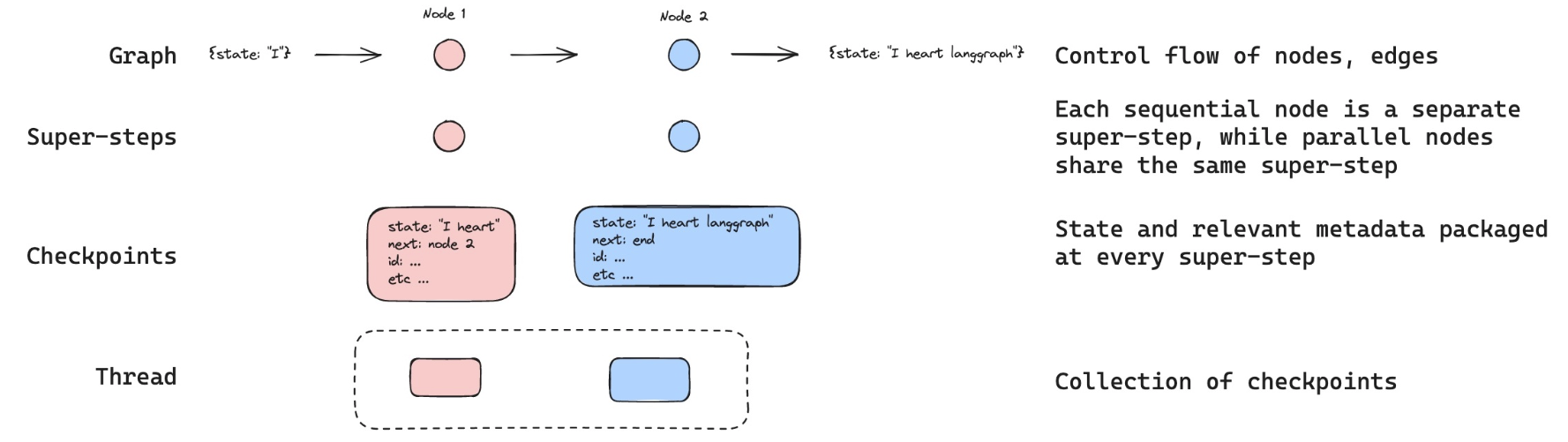
The checkpointer saves the state at each step as a checkpoint.
These saved checkpoints can be grouped into a thread of conversation.
Think about Slack as an analog: different channels carry different conversations.
Threads are like Slack channels, capturing grouped collections of state (e.g., conversation).
Below, we use configurable to set a thread ID.
# Create a thread
config = {"configurable": {"thread_id": "1"}}

# Start conversation
input_message = HumanMessage(content="hi! I'm Lance")
output = graph.invoke({"messages": [input_message]}, config)
for m in output['messages'][-1:]:
    m.pretty_print()

input_message = HumanMessage(content="what's my name?")
output = graph.invoke({"messages": [input_message]}, config)
for m in output['messages'][-1:]:
    m.pretty_print()

input_message = HumanMessage(content="i like the 49ers!")
output = graph.invoke({"messages": [input_message]}, config)
for m in output['messages'][-1:]:
    m.pretty_print()
================================== Ai Message ==================================

Hello Lance! How can I assist you today?
================================== Ai Message ==================================

You mentioned that your name is Lance. How can I help you today?
================================== Ai Message ==================================

That's great! The San Francisco 49ers have a rich history and a passionate fan base. Do you have a favorite player or a memorable game that you particularly enjoyed?
Now, we don't yet have a summary of the state because we still have < = 6 messages.
This was set in should_continue.
    # If there are more than six messages, then we summarize the conversation
    if len(messages) > 6:
        return "summarize_conversation"
We can pick up the conversation because we have the thread.
graph.get_state(config).values.get("summary","")
''
The config with thread ID allows us to proceed from the previously logged state!
input_message = HumanMessage(content="i like Nick Bosa, isn't he the highest paid defensive player?")
output = graph.invoke({"messages": [input_message]}, config)
for m in output['messages'][-1:]:
    m.pretty_print()
================================== Ai Message ==================================

Yes, as of September 2023, Nick Bosa became the highest-paid defensive player in NFL history. He signed a five-year contract extension with the San Francisco 49ers worth $170 million, with $122.5 million guaranteed. Bosa is known for his exceptional skills as a defensive end and has been a key player for the 49ers.
graph.get_state(config).values.get("summary","")
'Lance introduced himself and mentioned that he is a fan of the San Francisco 49ers, specifically highlighting his admiration for Nick Bosa. The conversation noted that as of September 2023, Nick Bosa became the highest-paid defensive player in NFL history with a five-year, $170 million contract extension with the 49ers.'
LangSmith
Let's review the trace!