

Time travel
Review
We discussed motivations for human-in-the-loop:
(1) Approval - We can interrupt our agent, surface state to a user, and allow the user to accept an action
(2) Debugging - We can rewind the graph to reproduce or avoid issues
(3) Editing - You can modify the state
We showed how breakpoints can stop the graph at specific nodes or allow the graph to dynamically interrupt itself.
Then we showed how to proceed with human approval or directly edit the graph state with human feedback.
Goals
Now, let's show how LangGraph supports debugging by viewing, re-playing, and even forking from past states.
We call this time travel.
from dotenv import load_dotenv
load_dotenv()
%%capture --no-stderr
%pip install --quiet -U langgraph langchain_deepseek langgraph_sdk langgraph-prebuilt
Let's build our agent.
from langchain_deepseek import ChatDeepSeek

def multiply(a: int, b: int) -> int:
    """Multiply a and b.

    Args:
        a: first int
        b: second int
    """
    return a * b

# This will be a tool
def add(a: int, b: int) -> int:
    """Adds a and b.

    Args:
        a: first int
        b: second int
    """
    return a + b

def divide(a: int, b: int) -> float:
    """Divide a by b.

    Args:
        a: first int
        b: second int
    """
    return a / b

tools = [add, multiply, divide]
llm = ChatDeepSeek(model="deepseek-v4-pro")
llm_with_tools = llm.bind_tools(tools)
from IPython.display import Image, display

from langgraph.checkpoint.memory import MemorySaver
from langgraph.graph import MessagesState
from langgraph.graph import START, END, StateGraph
from langgraph.prebuilt import tools_condition, ToolNode

from langchain_core.messages import AIMessage, HumanMessage, SystemMessage

# System message
sys_msg = SystemMessage(content="You are a helpful assistant tasked with performing arithmetic on a set of inputs.")

# Node
def assistant(state: MessagesState):
   return {"messages": [llm_with_tools.invoke([sys_msg] + state["messages"])]}

# Graph
builder = StateGraph(MessagesState)

# Define nodes: these do the work
builder.add_node("assistant", assistant)
builder.add_node("tools", ToolNode(tools))

# Define edges: these determine the control flow
builder.add_edge(START, "assistant")
builder.add_conditional_edges(
    "assistant",
    # If the latest message (result) from assistant is a tool call -> tools_condition routes to tools
    # If the latest message (result) from assistant is a not a tool call -> tools_condition routes to END
    tools_condition,
)
builder.add_edge("tools", "assistant")

memory = MemorySaver()
graph = builder.compile(checkpointer=MemorySaver())

# Show
display(Image(graph.get_graph(xray=True).draw_mermaid_png()))

Let's run it, as before.
# Input
initial_input = {"messages": HumanMessage(content="Multiply 2 and 3")}

# Thread
thread = {"configurable": {"thread_id": "1"}}

# Run the graph until the first interruption
for event in graph.stream(initial_input, thread, stream_mode="values"):
    event['messages'][-1].pretty_print()
================================ Human Message =================================

Multiply 2 and 3
================================== Ai Message ==================================
Tool Calls:
  multiply (call_ikJxMpb777bKMYgmM3d9mYjW)
 Call ID: call_ikJxMpb777bKMYgmM3d9mYjW
  Args:
    a: 2
    b: 3
================================= Tool Message =================================
Name: multiply

6
================================== Ai Message ==================================

The result of multiplying 2 and 3 is 6.
Browsing History
We can use get_state to look at the current state of our graph, given the thread_id!
graph.get_state({'configurable': {'thread_id': '1'}})
We can also browse the state history of our agent.
get_state_history lets us get the state at all prior steps.
all_states = [s for s in graph.get_state_history(thread)]
len(all_states)
5
The first element is the current state, just as we got from get_state.
all_states[-2]
StateSnapshot(values={'messages': [HumanMessage(content='Multiply 2 and 3', id='4ee8c440-0e4a-47d7-852f-06e2a6c4f84d')]}, next=('assistant',), config={'configurable': {'thread_id': '1', 'checkpoint_ns': '', 'checkpoint_id': '1ef6a440-a003-6c74-8000-8a2d82b0d126'}}, metadata={'source': 'loop', 'writes': None, 'step': 0, 'parents': {}}, created_at='2024-09-03T22:29:52.988265+00:00', parent_config={'configurable': {'thread_id': '1', 'checkpoint_ns': '', 'checkpoint_id': '1ef6a440-9ffe-6512-bfff-9e6d8dc24bba'}}, tasks=(PregelTask(id='ca669906-0c4f-5165-840d-7a6a3fce9fb9', name='assistant', error=None, interrupts=(), state=None),))
Everything above we can visualize here:
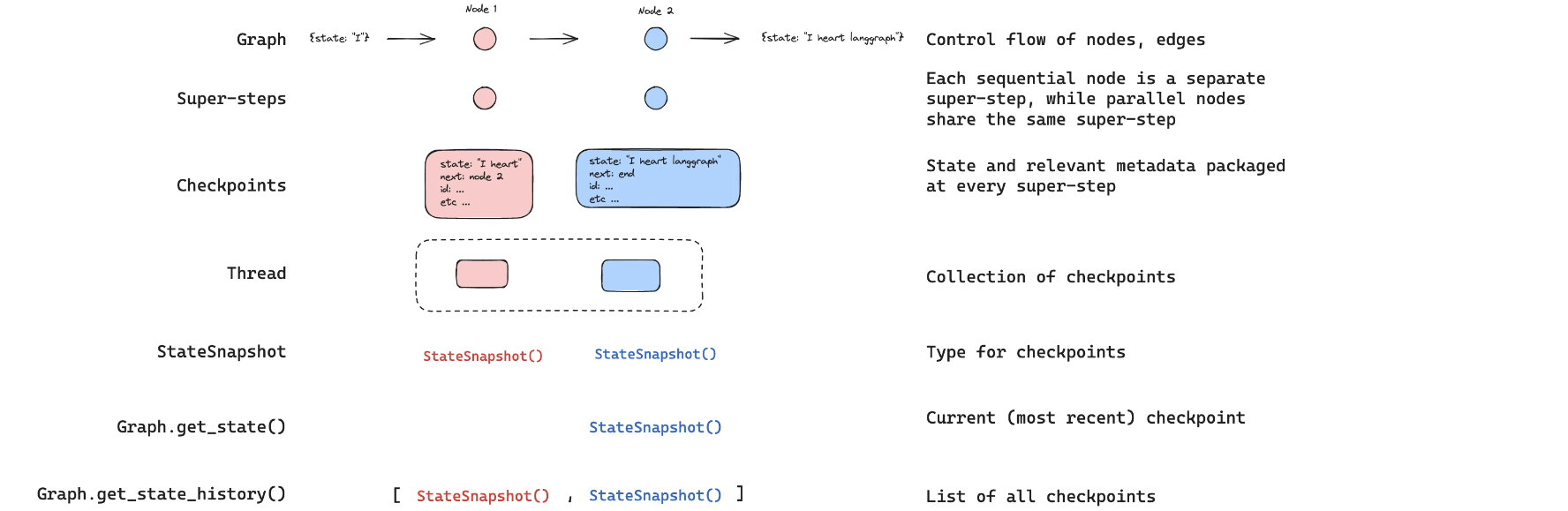
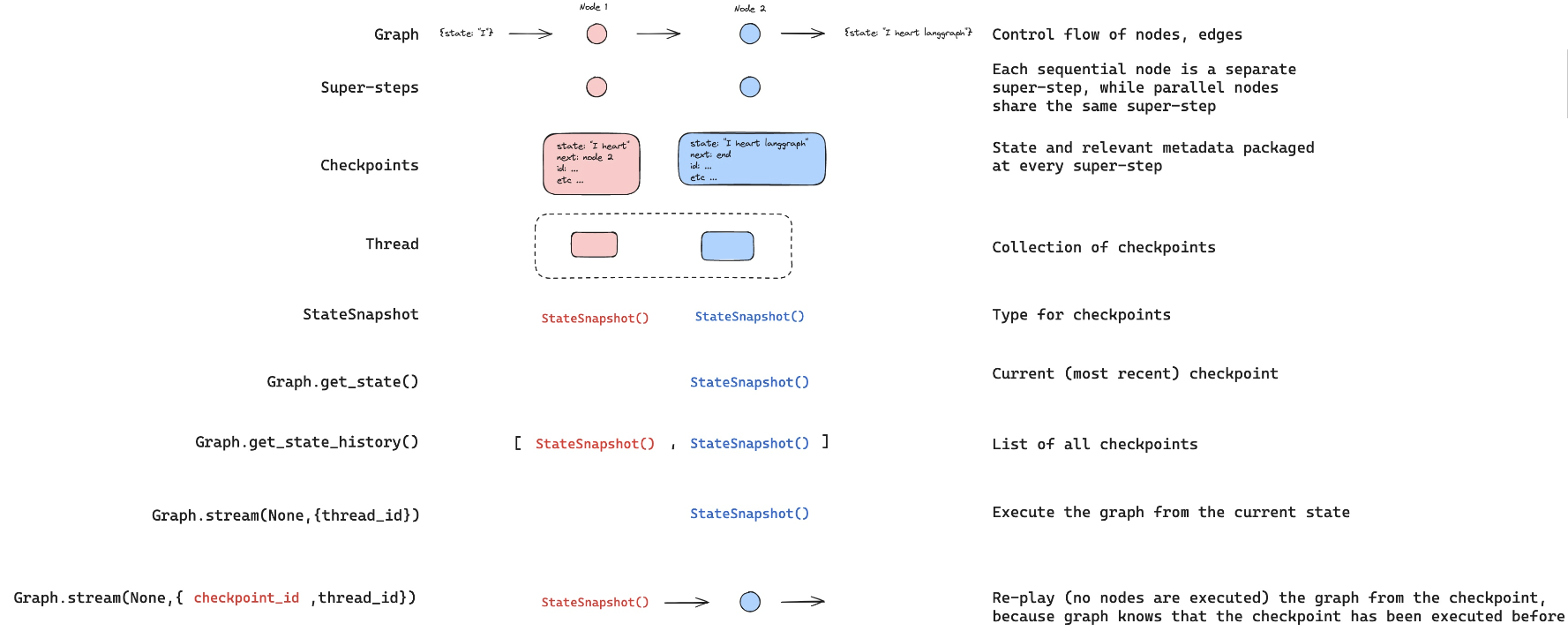
Let's look back at the step that recieved human input!
to_replay = all_states[-2]
to_replay
StateSnapshot(values={'messages': [HumanMessage(content='Multiply 2 and 3', id='4ee8c440-0e4a-47d7-852f-06e2a6c4f84d')]}, next=('assistant',), config={'configurable': {'thread_id': '1', 'checkpoint_ns': '', 'checkpoint_id': '1ef6a440-a003-6c74-8000-8a2d82b0d126'}}, metadata={'source': 'loop', 'writes': None, 'step': 0, 'parents': {}}, created_at='2024-09-03T22:29:52.988265+00:00', parent_config={'configurable': {'thread_id': '1', 'checkpoint_ns': '', 'checkpoint_id': '1ef6a440-9ffe-6512-bfff-9e6d8dc24bba'}}, tasks=(PregelTask(id='ca669906-0c4f-5165-840d-7a6a3fce9fb9', name='assistant', error=None, interrupts=(), state=None),))
Look at the state.
to_replay.values
{'messages': [HumanMessage(content='Multiply 2 and 3', id='4ee8c440-0e4a-47d7-852f-06e2a6c4f84d')]}
We can see the next node to call.
to_replay.next
('assistant',)
We also get the config, which tells us the checkpoint_id as well as the thread_id.
to_replay.config
{'configurable': {'thread_id': '1',
  'checkpoint_ns': '',
  'checkpoint_id': '1ef6a440-a003-6c74-8000-8a2d82b0d126'}}
To replay from here, we simply pass the config back to the agent!
The graph knows that this checkpoint has aleady been executed.
It just re-plays from this checkpoint!
for event in graph.stream(None, to_replay.config, stream_mode="values"):
    event['messages'][-1].pretty_print()
================================ Human Message =================================

Multiply 2 and 3
================================== Ai Message ==================================
Tool Calls:
  multiply (call_SABfB57CnDkMu9HJeUE0mvJ9)
 Call ID: call_SABfB57CnDkMu9HJeUE0mvJ9
  Args:
    a: 2
    b: 3
================================= Tool Message =================================
Name: multiply

6
================================== Ai Message ==================================

The result of multiplying 2 and 3 is 6.
Now, we can see our current state after the agent re-ran.
to_fork = all_states[-2]
to_fork.values["messages"]
[HumanMessage(content='Multiply 2 and 3', id='4ee8c440-0e4a-47d7-852f-06e2a6c4f84d')]
Again, we have the config.
to_fork.config
{'configurable': {'thread_id': '1',
  'checkpoint_ns': '',
  'checkpoint_id': '1ef6a440-a003-6c74-8000-8a2d82b0d126'}}
Let's modify the state at this checkpoint.
We can just run update_state with the checkpoint_id supplied.
Remember how our reducer on messages works:
- It will append, unless we supply a message ID.
- We supply the message ID to overwrite the message, rather than appending to state!
So, to overwrite the the message, we just supply the message ID, which we have to_fork.values["messages"].id.
fork_config = graph.update_state(
    to_fork.config,
    {"messages": [HumanMessage(content='Multiply 5 and 3',
                               id=to_fork.values["messages"][0].id)]},
)
fork_config
{'configurable': {'thread_id': '1',
  'checkpoint_ns': '',
  'checkpoint_id': '1ef6a442-3661-62f6-8001-d3c01b96f98b'}}
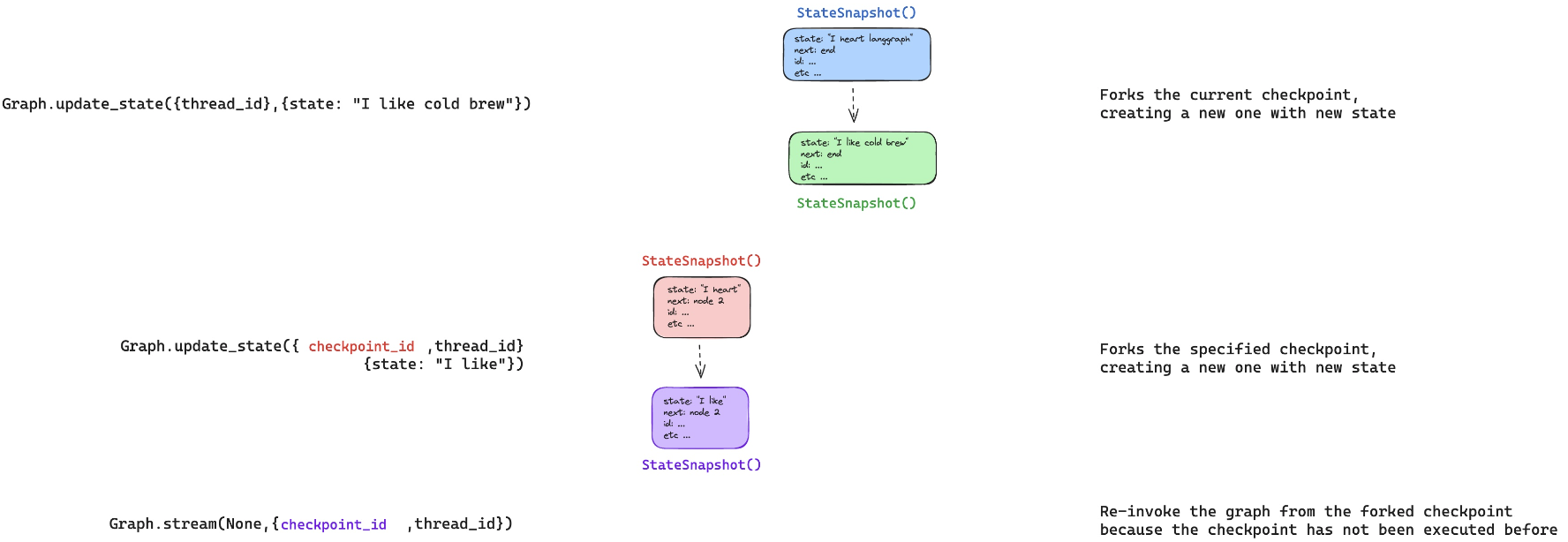
This creates a new, forked checkpoint.
But, the metadata - e.g., where to go next - is perserved!
We can see the current state of our agent has been updated with our fork.
all_states = [state for state in graph.get_state_history(thread) ]
all_states[0].values["messages"]
[HumanMessage(content='Multiply 5 and 3', id='4ee8c440-0e4a-47d7-852f-06e2a6c4f84d')]
graph.get_state({'configurable': {'thread_id': '1'}})
StateSnapshot(values={'messages': [HumanMessage(content='Multiply 5 and 3', id='4ee8c440-0e4a-47d7-852f-06e2a6c4f84d')]}, next=('assistant',), config={'configurable': {'thread_id': '1', 'checkpoint_ns': '', 'checkpoint_id': '1ef6a442-3661-62f6-8001-d3c01b96f98b'}}, metadata={'source': 'update', 'step': 1, 'writes': {'__start__': {'messages': [HumanMessage(content='Multiply 5 and 3', id='4ee8c440-0e4a-47d7-852f-06e2a6c4f84d')]}}, 'parents': {}}, created_at='2024-09-03T22:30:35.598707+00:00', parent_config={'configurable': {'thread_id': '1', 'checkpoint_ns': '', 'checkpoint_id': '1ef6a440-a003-6c74-8000-8a2d82b0d126'}}, tasks=(PregelTask(id='f8990132-a8d3-5ddd-8d9e-1efbfc220da1', name='assistant', error=None, interrupts=(), state=None),))
Now, when we stream, the graph knows this checkpoint has never been executed.
So, the graph runs, rather than simply re-playing.
for event in graph.stream(None, fork_config, stream_mode="values"):
    event['messages'][-1].pretty_print()
================================ Human Message =================================

Multiply 5 and 3
================================== Ai Message ==================================
Tool Calls:
  multiply (call_KP2CVNMMUKMJAQuFmamHB21r)
 Call ID: call_KP2CVNMMUKMJAQuFmamHB21r
  Args:
    a: 5
    b: 3
================================= Tool Message =================================
Name: multiply

15
================================== Ai Message ==================================

The result of multiplying 5 and 3 is 15.
Now, we can see the current state is the end of our agent run.
graph.get_state({'configurable': {'thread_id': '1'}})
Time travel with LangGraph API
⚠️ Notice
Since filming these videos, we've updated Studio so that it can now be run locally and accessed through your browser. This is the preferred way to run Studio instead of using the Desktop App shown in the video. It is now called LangSmith Studio instead of LangGraph Studio. Detailed setup instructions are available in the "Getting Setup" guide at the start of the course. You can find a description of Studio here, and specific details for local deployment here.
To start the local development server, run the following command in your terminal in the /studio directory in this module:
langgraph dev
You should see the following output:
- 🚀 API: http://127.0.0.1:2024
- 🎨 Studio UI: https://smith.langchain.com/studio/?baseUrl=http://127.0.0.1:2024
- 📚 API Docs: http://127.0.0.1:2024/docs
Open your browser and navigate to the Studio UI URL shown above.
We connect to it via the SDK and show how the LangGraph API supports time travel.
if 'google.colab' in str(get_ipython()):
    raise Exception("Unfortunately LangGraph Studio is currently not supported on Google Colab")
from langgraph_sdk import get_client
client = get_client(url="http://127.0.0.1:2024")
Re-playing
Let's run our agent streaming updates to the state of the graph after each node is called.
initial_input = {"messages": HumanMessage(content="Multiply 2 and 3")}
thread = await client.threads.create()
async for chunk in client.runs.stream(
    thread["thread_id"],
    assistant_id = "agent",
    input=initial_input,
    stream_mode="updates",
):
    if chunk.data:
        assisant_node = chunk.data.get('assistant', {}).get('messages', [])
        tool_node = chunk.data.get('tools', {}).get('messages', [])
        if assisant_node:
            print("-" * 20+"Assistant Node"+"-" * 20)
            print(assisant_node[-1])
        elif tool_node:
            print("-" * 20+"Tools Node"+"-" * 20)
            print(tool_node[-1])
Now, let's look at replaying from a specified checkpoint.
We simply need to pass the checkpoint_id.
states = await client.threads.get_history(thread['thread_id'])
to_replay = states[-2]
to_replay
{'values': {'messages': [{'content': 'Multiply 2 and 3',
    'additional_kwargs': {'example': False,
     'additional_kwargs': {},
     'response_metadata': {}},
    'response_metadata': {},
    'type': 'human',
    'name': None,
    'id': 'df98147a-cb3d-4f1a-b7f7-1545c4b6f042',
    'example': False}]},
 'next': ['assistant'],
 'tasks': [{'id': 'e497456f-827a-5027-87bd-b0ccd54aa89a',
   'name': 'assistant',
   'error': None,
   'interrupts': [],
   'state': None}],
 'metadata': {'step': 0,
  'run_id': '1ef6a449-7fbc-6c90-8754-4e6b1b582790',
  'source': 'loop',
  'writes': None,
  'parents': {},
  'user_id': '',
  'graph_id': 'agent',
  'thread_id': '708e1d8f-f7c8-4093-9bb4-999c4237cb4a',
  'created_by': 'system',
  'assistant_id': 'fe096781-5601-53d2-b2f6-0d3403f7e9ca'},
 'created_at': '2024-09-03T22:33:51.380352+00:00',
 'checkpoint_id': '1ef6a449-817f-6b55-8000-07c18fbdf7c8',
 'parent_checkpoint_id': '1ef6a449-816c-6fd6-bfff-32a56dd2635f'}
Let's stream with stream_mode="values" to see the full state at every node as we replay.
async for chunk in client.runs.stream(
    thread["thread_id"],
    assistant_id="agent",
    input=None,
    stream_mode="values",
    checkpoint_id=to_replay['checkpoint_id']
):
    print(f"Receiving new event of type: {chunk.event}...")
    print(chunk.data)
    print("\n\n")
We can all view this as streaming only updates to state made by the nodes that we reply.
async for chunk in client.runs.stream(
    thread["thread_id"],
    assistant_id="agent",
    input=None,
    stream_mode="updates",
    checkpoint_id=to_replay['checkpoint_id']
):
    if chunk.data:
        assisant_node = chunk.data.get('assistant', {}).get('messages', [])
        tool_node = chunk.data.get('tools', {}).get('messages', [])
        if assisant_node:
            print("-" * 20+"Assistant Node"+"-" * 20)
            print(assisant_node[-1])
        elif tool_node:
            print("-" * 20+"Tools Node"+"-" * 20)
            print(tool_node[-1])
Forking
Now, let's look at forking.
Let's get the same step as we worked with above, the human input.
Let's create a new thread with our agent.
initial_input = {"messages": HumanMessage(content="Multiply 2 and 3")}
thread = await client.threads.create()
async for chunk in client.runs.stream(
    thread["thread_id"],
    assistant_id="agent",
    input=initial_input,
    stream_mode="updates",
):
    if chunk.data:
        assisant_node = chunk.data.get('assistant', {}).get('messages', [])
        tool_node = chunk.data.get('tools', {}).get('messages', [])
        if assisant_node:
            print("-" * 20+"Assistant Node"+"-" * 20)
            print(assisant_node[-1])
        elif tool_node:
            print("-" * 20+"Tools Node"+"-" * 20)
            print(tool_node[-1])
states = await client.threads.get_history(thread['thread_id'])
to_fork = states[-2]
to_fork['values']
{'messages': [{'content': 'Multiply 2 and 3',
   'additional_kwargs': {'example': False,
    'additional_kwargs': {},
    'response_metadata': {}},
   'response_metadata': {},
   'type': 'human',
   'name': None,
   'id': '93c18b95-9050-4a52-99b8-9374e98ee5db',
   'example': False}]}
to_fork['values']['messages'][0]['id']
'93c18b95-9050-4a52-99b8-9374e98ee5db'
to_fork['next']
['assistant']
to_fork['checkpoint_id']
'1ef6a44b-27ec-681c-8000-ff7e345aee7e'
Let's edit the state.
Remember how our reducer on messages works:
- It will append, unless we supply a message ID.
- We supply the message ID to overwrite the message, rather than appending to state!
forked_input = {"messages": HumanMessage(content="Multiply 3 and 3",
                                         id=to_fork['values']['messages'][0]['id'])}

forked_config = await client.threads.update_state(
    thread["thread_id"],
    forked_input,
    checkpoint_id=to_fork['checkpoint_id']
)
forked_config
{'configurable': {'thread_id': 'c99502e7-b0d7-473e-8295-1ad60e2b7ed2',
  'checkpoint_ns': '',
  'checkpoint_id': '1ef6a44b-90dc-68c8-8001-0c36898e0f34'},
 'checkpoint_id': '1ef6a44b-90dc-68c8-8001-0c36898e0f34'}
states = await client.threads.get_history(thread['thread_id'])
states[0]
{'values': {'messages': [{'content': 'Multiply 3 and 3',
    'additional_kwargs': {'additional_kwargs': {},
     'response_metadata': {},
     'example': False},
    'response_metadata': {},
    'type': 'human',
    'name': None,
    'id': '93c18b95-9050-4a52-99b8-9374e98ee5db',
    'example': False}]},
 'next': ['assistant'],
 'tasks': [{'id': 'da5d6548-62ca-5e69-ba70-f6179b2743bd',
   'name': 'assistant',
   'error': None,
   'interrupts': [],
   'state': None}],
 'metadata': {'step': 1,
  'source': 'update',
  'writes': {'__start__': {'messages': {'id': '93c18b95-9050-4a52-99b8-9374e98ee5db',
     'name': None,
     'type': 'human',
     'content': 'Multiply 3 and 3',
     'example': False,
     'additional_kwargs': {},
     'response_metadata': {}}}},
  'parents': {},
  'graph_id': 'agent'},
 'created_at': '2024-09-03T22:34:46.678333+00:00',
 'checkpoint_id': '1ef6a44b-90dc-68c8-8001-0c36898e0f34',
 'parent_checkpoint_id': '1ef6a44b-27ec-681c-8000-ff7e345aee7e'}
To rerun, we pass in the checkpoint_id.
async for chunk in client.runs.stream(
    thread["thread_id"],
    assistant_id="agent",
    input=None,
    stream_mode="updates",
    checkpoint_id=forked_config['checkpoint_id']
):
    if chunk.data:
        assisant_node = chunk.data.get('assistant', {}).get('messages', [])
        tool_node = chunk.data.get('tools', {}).get('messages', [])
        if assisant_node:
            print("-" * 20+"Assistant Node"+"-" * 20)
            print(assisant_node[-1])
        elif tool_node:
            print("-" * 20+"Tools Node"+"-" * 20)
            print(tool_node[-1])
LangGraph Studio
Let's look at forking in the Studio UI with our agent, which uses module-1/studio/agent.py set in module-1/studio/langgraph.json.